Google Play Store Ke Secret Tips and Tricks in Hindi

Google Play Store Ke Secret Tips and Tricks in Hindi , Friends aap sab log google play store ko use karte honge par aaj is post me mai aapko google play store ke kuch bahut hi secret or interesting features or settings ke bare me bataunga jo sayad aapko nahi pata ho , Par ye sare google play store ke features bahut hi kaam ke hai Jo ki har google play store ko use karne vale ko ye pata hona chahiye .
Google Play Store Ke Secret Tips and Tricks mai aapko bataunga isse aapke google play store ko use karne ka ek alag hi experience hoga . Google play store ki in hidden settings ko jaan kar aap sabse aage nikal sakte hai. To time ko barbaad ne karte huve sidhe Google Play Store Ke Secret Tips and Tricks or uski hidden settings ko jante hai .
Google Play Store Ke Secret Tips and Tricks in Hindi
Google Play store me bahut sare features hai lakin hum jinko dekhenge vo aapke kafi kam ke sabit ho sakte hai . To ham in sam ko ek ek kar ke dekhte hai or samajhte hai ki ye features kya hai or kyu use karna chahiye or kaise use karte hai .
1. Add To Wishlist (Kisi Bhi App Ko Wishlist Me Add Kare)
Friends kai baar aap google play store me kuch search kar rahe hote hai or aapke samne kuch aisi mobile apps aati hia jo aapko bahut hi pasand aati hia par aap us time un apps ko kisi karan ke install nahi kar pate hai Or fir jab aap baad me kabhi un mobile apps ko khojte hai or search karne ki kosis karte hai to aapko unka name yaad nahi rahta hai ya vo aapko nahi milti hai . To friends is problem ka ek bahut hi aacha solution hai. Google play store ka feature Add To Wishlist .
Google Play store ke add to wishlist feature se hum apps ko wishlist me add kar sakte hai . Taki hum baad me apni wishlist me jakar un apps ko dekhe sake jo aapko pasand aai thi ya jinko hum baad me install karna chahte the . To chaliye jante hai ki wishlist me apps ko kaise add karne hai .
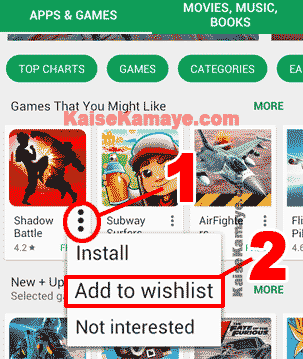
Wishlist me add karne ke liye 2 karike hai , Pahla tarikah janne ke liye niche image dekhe .
Google Play Store Ke Secret Tips and Tricks in Hindi
- Sabse aphle App ke corner par bane Tin Dot par click kare .
- Ab aapke samne kai sare option aayenge , In Options me se Add to wishlist par click kare . uper image me point 2 dekhe .
Dusra tarika ye hai ki jis bhi mobile app ko wishlist me add karna hai us application ke page me jaye or fir vaha aapko right side me + ka icon dikhega , + ke icon par click kar de . niche image dekhe.

Google Play Store Ke Secret Tips and Tricks in Hindi , Add to wishlist
To abhi hamne jana ki kisi bhi App ko wishlist me kaise add karte hai , Ab hame jante hia ki apps ko wislist me add kane ke baad hum apni wishlist ko kaise dekhte hai . Uske liye google play store me jaye or fir uper left side me bani tin line par click kare . niche image dekhe .

Google Play Store Ke Secret Tips and Tricks in Hindi
Ab aapke samne kai sare option aayenge , yaha par aapko Wishlist likha huva dikhega is par click kare . niche image dekhe .

Google Play Store Ke Secret Tips and Tricks in Hindi , Google Play Store Wishlist
Jaise hi hum Wishlist par click karenge hamare samne vo sabhi apps aa jayengi jo hamne Wishlist me add ki thi .
2. Early Access (Apps Ko Release Hone se Pahle Use Kare)
Early access google play store ka bahut hi badhiya feature hai yaha se hum un mobile apps ko access kar sakte hai jo abhi release bhi nahi hui hai or sath hi sath un apps ko bhi use kar sakte hai jo apps abhi ban hi rahi hai (under development hai ) . To chaliye jante hai ki kaise hum google play store ke Early access vale feature ko use kar sakte hai .
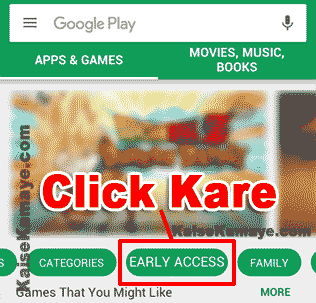
Google play store ke EARLY ACCESS ko use karne ke liye google play store me jaye or fir vaha kuch tabs honge unko left side me scroll kare , yaha aapko EARLY ACCESS ka tab dikhega us par click kar de . niche image dekhe .
Google Play Store Ke Secret Tips and Tricks in Hindi, Early Access
EARLY ACCESS par click karte hi aap EARLY ACCESS ke page me chale jayenge , yaha par aap un apps ko dekh sakte hai jo abhi release bhi nahi hui hai or un apps ko bhi aap dekh payenge jo under development hai . To aap in apps ko release hone se apne hi use kar sakte hai .
3. Parental Controls (18+ Ya Age Ke Hisab Se Apps Ko Filter Kare)
Friends aapne dekha hoga ki kai bar jab hum google play store me jate hai or Apps ko dekh rahe hote hai to hamre samne kai bar 18+ adult apps bhi aa jate hai . To aapne kai bar soncha hoga ki in gandi apps ko kaise hide kare , kuki ho sakta hai aapke ghar me bhache ho or vo bhi aapka mobile use karte ho or koi bhi nahi chahega ki bachhe is tareh ki apps ko use kare or dekhe . To hum bahut aaram se google play store me age ke hisab se filter laga sakte hai .
Google play store ke Parental controls ke option se , hum Parental controls se Apps, Movies or yaha tak ki music par bhi filter laga sakte hai . Is option ko use karne ke liye niche diye huve steps ko follow kare .
Sabse pahle google play store me jaye or vaha uper left side me Tin Lins par click kare .
Google Play Store Ke Secret Tips and Tricks in Hindi
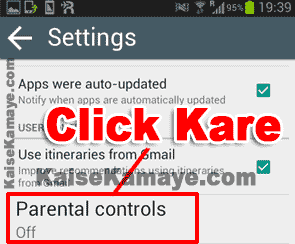
Ab aapke samne kai sare option aayenge , Un options me se aap Settings par click kare . Settings par click karne ke baad aap settings me chale jayenge yaha par aapko Parental controls dikhega us par click kare . Settings >> Parental controls
Google Play Store Ke Secret Tips and Tricks in Hindi, Google Play Store Parental Controls
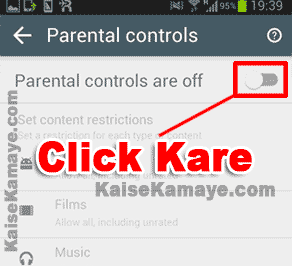
Parental controls par click karte hi hum Parental controls ki settings me chale jayenge . Yaha par aap dekhenge ki Parental controls abhi off hai , On karne ke liye uper right side me button par click kare . niche image dekhe .
Google Play Store Ke Secret Tips and Tricks in Hindi , Parental controls
Jaise hi Parental controls ko hum on karnege hamare samne PIN set karne ke liye popup aayega . apna pin set kare . PIN ko set karne ke baad hum bade hi aaram se Apps , Films or Music me age filter set kar sakte hai .
4. Become a Beta Tester (Kisi Bhi App Ke New Feature Ko Release Se Pahle Use Kare)
Apne apne mobile me bahut sari mobile apps ko install kar rakha hoga . Par kya aapko pata hai ki hum inme se bahut sari apps ke aane vale new features ko Beta Tester ban kar use kar sakte hai jo abhi release bhi nahi huve hai . Beta Tester ban kar hum sabse pahle un features ko use kar payenge or sabse aage rah aayenge , kuki jo feature release honge vo hum pahle hi use kar chuke honge .
Sabse pahle us mobile application ke page me jaye jiske aap Beta tester banna chahte hai . Ab niche ki taref scroll kare , niche scroll karne ke baad aapko yaha par likha huva dikhega Become a beta tester , Yaha par aapko I’M IN ka button dikhega us par click kar de . niche image dekhe .

Google Play Store Ke Secret Tips and Tricks in Hindi, Become a beta tester
Jaise hi aap I’M IN ki button par click karenge , aapke samne ek pop up aayega vaha par Join par click kar de , Or Join par click karte hi aap Beta tester ban jayenge .
5. Apps Auto Update (Apps Ke Auto Update Ko Control Kare)
Mujhse kai logo ne pucha hai ki unke mobile me apps apne aap auto update hone lagti hai usko rakne ka kya terika hai , kya koi setting hai jisse auto update ko control kar sakte hai . Ji haa hum apps ke auto update ko bade aaram se control kar sakte hai . Auto update ko hum google play store ki settings se aaram se control kar sakte hai . Chaliye auto update kaise control kare jante hai .
Google Play store me jaye or fir left side me uper Tin Lines par click kare .
Google Play Store Ke Secret Tips and Tricks in Hindi
Ab aapke samne kaise sare option aayenge. Usme se Settings par click kare , Settings par click karte hi aap google play store ki settings me chale jayenge . Yaha par aapko Auto-update apps likha huve dikhega , us par click kare .
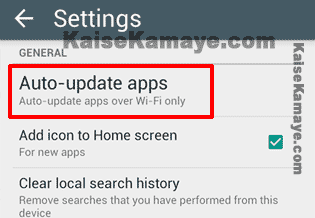
Google Play Store Ke Secret Tips and Tricks in Hindi, Google Play Store Auto Update settings
Jaise hi aap Auto-update apps par click karenge apke samne ek pop up aayega , jaha par aapke samne tin option dikhenge . apgar aap pahla option select karenge to Auto update nahi hoga , dusre option me apka mobile data ka bhi use kar ke Auto updata ho jayega or tisre option me jab aap wifi se connect honge tabhi apps auto update hongi .
6. Add icon To Home Screen (Apps Ke Icon Ko Home Screen Me Add Hone Se Rake)
Apne dekha hoga ki jab bhi hum koi new app ko apne mobile me install karte hai to us app ka icon hamari home screen par add ho jata hai , Jo ki bahut sare logo ko pasand nahi hota hai ki icon home screen par add ho . Friends hum isko bhi google play store ki settings se aaram se control kar sakte hai or Apps ke Icon ko home screen me add hone se rok sakte hai .
Google play store me jaye or fir vaha uper left side me uper Tin Lines dikhegi us par click kare .
Google Play Store Ke Secret Tips and Tricks in Hindi
Tin Lines par click karte hi hamare samne kai option aayege , hame yaha par Settings par click karne hai ot Settings par click karne ke baad ab aap google play store ki settings me chale jayenge . Yaha par aapko Add icon to Home screen likha huva dikhega or uske aage Tik ka nishaan hoga us par click kar ke Tik ko hata de .
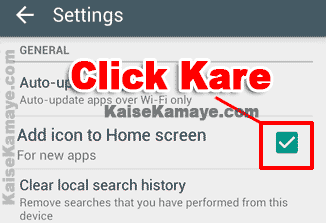
Google Play Store Ke Secret Tips and Tricks in Hindi , Add Icon To Home Screen Settings
Tik ke nisaan ko hatane ke baad ab aap koi bhi app ko install karenge to us app ka icon home screen par add nahi honge .
7. Find all Your installed Apps (Mobile Me Install Sabhi Apps Ka Pata Lagaye)
Kai bar hume ye pata nhi hota hai ki hume apne mobile me kon kon si apps ko install kar rakha hai . Kuki kai bar hume isko janne ki jarurat pad jaati hai or kai bare hume ye bhi janne ki jarurat pad jati hai ki jis email (google account se) google play store me login kiya hai us id se humne abhi tak kon kon si application ko install kiya hai .
Hum google play store se bahut hi aaram se pata laga skte hai ki humne kon kon si app ko apne mobile me install kiya hai or kon kon si apps ko hamne aaj tak apni google id se install kiya hai , ye janne ke liye niche diye steps ko follow kare .
Sabse aphle aap google play store me jaye or vaha uper left side me Tin lines par click kare . niche image dekhe .
Google Play Store Ke Secret Tips and Tricks in Hindi
Ab aapke samne kai sare option aa jayenge , yaha par aapko My apps & games dekhega us par click kare .
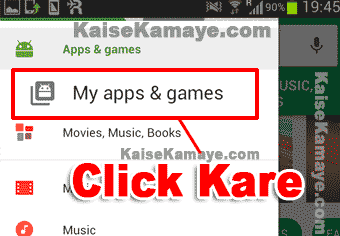
Google Play Store Ke Secret Tips and Tricks in Hindi , Find Your All apps .
par click karte hi aapke same vo sabhi apps aa jayengi jo aake mobile me install hai or agar aap All tab par click karenge to un apps ko bhi dekh payenge jo aapne apne google account se abhi tak install ki hongi .
8. Indie Corner (New Or Behtarin Apps Ka Pata Lagaye)
Friends ab mai aapko ye batana chahta hu ki agar hame new apps ka pata lagana ho , jo 1 month ya , 1 week pahle release hui ho to ager hum google play store me ja ke search kare to kaafi problem hoti hai . Me aapko aisi jageh bataunga jaya se aap leatest or bahut hi badhiya apps ka aarame se pata laga sakte hai . Is jageh ka name hai Indie Corner , To chaliye jante hai ki isko access kaise karna hai .
Indie Corner me jane ke liye google play store se bahar aa jaiye or apne mobile me internet browser ko open kare or google par search kare indie corner .
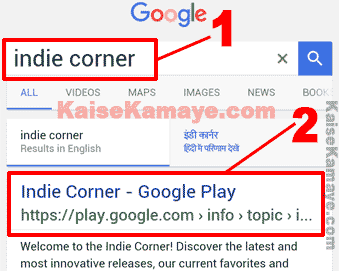
Google Play Store Ke Secret Tips and Tricks in Hindi , Google Play store indie corner
- Google search box me indie corner likhe kar search kare .
- Search karne ke baad jo result aayenge usme se Indie Corner – Google Play vale link par click kare .
Jaise hi aap Indie Corner – Google Play vale link par click karenge aap indie corner ke page me chale jayenge , yaha se aap new apps or intresting apps ko aaran se dekhe sakte hai or use kar sakte hai .
To friends aapko ye post Google Play Store Ke Secret Tips and Tricks in Hindi kaisi lagi hume comment kar ke , Or aapko konsi trick sabse achi lage comment kar ke jarur bataye or is information ko jyada se jyada logo me share kare taaki unhe bhi in sab ke bare me pata chale .
Video Tutorial :
Google Play Store Ke Secret Tips and Tricks ko janne ke liye aap niche diye gaye video ko bhi dekh sakte hai ( Secret Hidden Features Of Google Play Store in Hindi ) video me jo tricks ko bataya gaya hai vo har google play store ko use karne vale ko janna chahiye ye sab bahut hi useful tips hai .
Agar aap is tarah ke or Hindi tutorial ko dekhna chahte hai to yaha click kare : Hindi Video
[su_youtube url=”https://www.youtube.com/watch?v=k7plONDGKD8″]
Agar aapko ye video pasand aaya ho to hindi ke YouTube chennal ko subscribe jarur kare . Subscribe karen ke liye yaha click kare : Subscribe
Agar aap yaha par apna video chahte hai to Contact Us.
[su_divider]
Google Play Store Ke Secret Tips and Tricks in Hindi, Google Play Store Ke Secret Tricks , Google Play Store ke Tricks and Tips in Hindi , Google Play Store Ki Hidden Settings , Google Play Store Tricks .









bahut achi information google play store ke baare me share ki hai kafi helpful hai. (internethappyworld.com)
Thanks For Comment . Sanju Dangar
Thanks Sir…! This information is very nice. Thanks…! Thanks…! Thanks…!
Thanks For Comment , Suraj !
Thanks Sir Jee…!
Thanks For Comment Aman Kumar !
Good Morning Freinds… Internet Se Jude Kisi Bhi sawaal Ka Jawaab Paane Ke Liye Humare Website Par Visit Kar Sakte Hai, Thank You. allmehindihelp.com
hahahaha kuch bhi !